Alachua County court docket provides a clear record of scheduled hearings, case progress, and judicial updates for civil, criminal, and family matters. This system helps users track court activity through case numbers, party names, or filing dates. It offers timely details about hearing schedules, motions, and trial status. Regular updates keep information current, making it easier for residents, attorneys, and researchers to stay informed about ongoing and past court proceedings.
Alachua County court docket search allows quick case tracking through an organized online database that lists filings, court dates, and legal actions. Users can check case status, review hearing calendars, and follow trial progress without visiting the courthouse. The docket system supports transparency by presenting structured records that reflect real-time court activity. This makes it useful for legal research, background checks, and staying updated on important court developments within the county.
How to Search Alachua County Court Docket Online
Alachua County court docket search can be completed through the official docket schedule tool provided by the Clerk of Court. Users can enter a hearing date and apply filters in the Alachua County Court database to view scheduled cases, court times, and judge assignments.
The official online docket lookup tool (schedule search page) is available here: https://www.alachuaclerk.org/court_records/index.cfm?section=schedule
This case tracking portal focuses on daily hearing schedules and courtroom activity. It helps users check when a case will appear in court and who is presiding over it.
Access the Official Docket Schedule Portal
Start by opening the link above. This page leads directly to the alachua county court docket schedule system, which displays upcoming hearings.
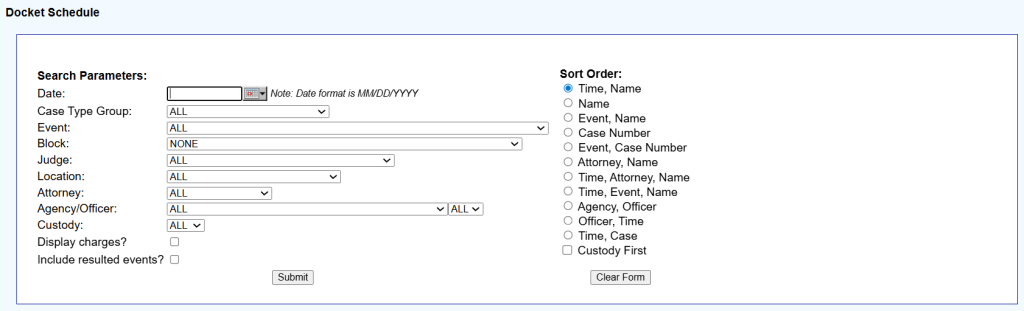
On the page, users will see a structured form with multiple search filters. Each field helps narrow results inside the court database.
Enter Hearing Date to Begin Search
The Date field is required to run a search.
- Enter date in MM/DD/YYYY format
- Select a specific day to view that day’s docket
Without a date, the system may not return results. This field controls the entire docket display.
Select Case Type and Event Filters
After entering the date, users can refine results using dropdown options.
Key filters include:
- Case Type Group → Civil, Criminal, Family, Traffic, or ALL
- Event → Hearing type such as trial, motion, arraignment
- Block → Time grouping (usually left as NONE)
Using these filters helps narrow results and makes the docket search Alachua County more precise.
Apply Judge, Location, and Attorney Filters
The form provides more advanced filters to refine the search further.
- Judge → View docket for a specific judge
- Location → Select courthouse or courtroom
- Attorney → Filter cases linked to a lawyer
- Agency/Officer → Law enforcement-based search
- Custody → In-custody case filter
These options are helpful for legal professionals or detailed case tracking.
Use Additional Options for Detailed Results
Users can activate extra options to expand docket details.
- Display charges → Shows charges linked to cases
- Include resulted events → Displays completed hearings
These checkboxes provide deeper insights into the alachua county court docket.
Choose Sort Order for Better Viewing
The system allows sorting results in different ways.
Common sorting options:
- Time, Name (default)
- Case Number
- Event, Name
- Attorney, Name
- Time, Case
The default setting works well for general users. Sorting helps organize results for easier reading.
Submit Search and View Docket Results
Click the Submit button after filling in the fields. The system will display a list of scheduled hearings.
Docket results include:
- Case number
- Party name
- Hearing time
- Judge name
- Event type
This information helps users track court appearances and schedule details.
Types of Cases Available in the Court Docket
Alachua County court docket includes multiple court case categories that reflect different types of legal matters handled within the county court system. These legal case records show scheduled hearings, filings, and updates tied to ongoing judicial proceedings. Each category follows a specific legal process, which helps users locate relevant case details quickly. The structured format of the alachua county court docket supports clear tracking of court activity across various case types.
Criminal Cases
Criminal cases in the alachua county court docket involve charges filed against a person for violating state laws. These judicial proceedings include serious and minor offenses, with each case moving through steps like arraignment, hearings, and trial. The docket displays important details such as charges, court dates, and judge assignments. These legal case records update as the case progresses, which helps users monitor outcomes and upcoming hearings.
- Felony offenses (serious crimes)
- Misdemeanor charges (less severe offenses)
- Drug-related cases
- Probation violations
Civil Cases
Civil cases listed in the alachua county court docket focus on disputes between parties rather than criminal actions or criminal records. These court case categories include disagreements related to contracts, property, or personal injury claims, which are handled separately from criminal records. The docket provides schedules for hearings, mediation, and trial dates. These legal case records help users follow the progress of disputes and review court actions tied to each case, along with related civil filings and updates.
- Contract disputes
- Property disagreements
- Personal injury claims
- Small claims cases
Family Court Cases
Family court cases in the alachua county court docket cover legal matters related to family relationships and responsibilities. These judicial proceedings include cases such as divorce, child custody, and support arrangements. The docket shows hearing schedules and court updates linked to these matters. Some legal case records may have limited details due to privacy rules, though basic scheduling information often remains visible.
- Divorce cases
- Child custody and visitation
- Child support matters
- Domestic violence petitions
Traffic & Minor Violations
Traffic and minor violations appear frequently in the alachua county court docket, covering low-level offenses related to driving and local rules. These court case categories include cases that usually resolve quickly through fines or brief hearings. The docket lists court dates, hearing times, and case status updates. These legal case records help users track deadlines and manage court appearances linked to violations.
- Speeding tickets
- Driving without a license
- Parking violations
- Local ordinance violations
How to Check Case Status & Hearing Dates
Case status and hearing dates in Alachua County are available through official court record systems that display case activity, filings, and scheduled appearances. The alachua county case status section shows whether a matter is active, pending, or resolved. Hearing details appear in the hearing schedule alachua county records, which list upcoming court dates, courtroom assignments, and case movements based on clerk updates.
Checking Case Status Updates
Case status updates reflect the current position of a case within the court process. These records show filings, motions, orders, and other legal actions recorded by the clerk’s office. Users often search by case number or party name to view progress. The system helps track whether a case is active, closed, or awaiting a hearing date. Updates change whenever new court actions are entered into official records.
Key case status details include:
- Active, pending, or closed status
- Filing date and case initiation details
- Recent motions or court orders
- Assigned judge or division information
- Latest docket activity entries
Tracking Hearing Schedules
Hearing schedules list all upcoming court appearances connected to a case. The hearing schedule alachua county system shows dates for motions, trials, arraignments, and review sessions. Each entry includes time, courtroom location, and case reference number. These schedules update when hearings are postponed, rescheduled, or completed. Regular review helps users stay informed about upcoming court activity and avoids missing important trial dates.
Common hearing schedule details include:
- Upcoming hearing dates and times
- Courtroom or division assignment
- Type of hearing (trial, motion, review)
- Case number reference
- Judge handling the proceeding
Monitoring Case Progress & Court Calendar
Case progress reflects how a matter moves through different stages of the court process, from filing to final judgment. The court calendar brings all scheduled hearings into one view, helping track trial updates and procedural events. It also shows changes in timing or status when court decisions are made. This section helps users follow legal movement across multiple cases within Alachua County records.
Key monitoring elements include:
- Court calendar listings for all cases
- Trial updates and schedule changes
- Case movement between hearings
- Continuances or rescheduled dates
- Final rulings or case closure updates
Court Calendar & Hearing Schedule
The court calendar alachua county presents a structured list of all scheduled court sessions, including hearings, motions, and trials across different divisions. It organizes the complete hearing timeline so case activity can be followed in a clear order. Each entry reflects court sessions assigned to judges, courtrooms, and specific dates. When updates occur, such as delays or rescheduling, the calendar adjusts to show the latest trial schedule and court session changes for accurate case tracking.
Court Calendar Structure and Case Listings
The court calendar works as a structured schedule of daily and weekly court sessions, listing civil, criminal, and traffic matters under assigned judges. Each record connects a case number with a hearing type and courtroom assignment, helping track legal activity across divisions. The trial schedule section shows when cases move forward for hearings or trial proceedings. This structure supports clear visibility of case flow from filing to courtroom appearances and scheduled court sessions.
Key court calendar elements:
- Daily and weekly court session listings
- Assigned judges and courtroom details
- Case numbers linked to hearing events
- Trial schedule for upcoming proceedings
- Motion, status, and review hearings
Hearing Timeline and Case Movement
The hearing timeline shows how a case progresses through different legal stages, starting from filing and moving toward final judgment. Each hearing marks a step such as arraignment, motion review, or trial appearance. The hearing timeline updates whenever new court actions are recorded, reflecting continuances, delays, or completed hearings. This structure helps follow how often a case appears before the court and what stage it currently holds within the judicial process.
Hearing timeline stages include:
- Initial arraignment or filing appearance
- Pre-trial motion hearings
- Scheduled trial hearings
- Status review sessions
- Final judgment or closure hearing
Tracking Court Sessions and Trial Updates
Court sessions represent scheduled courtroom proceedings listed in the calendar, covering hearings for civil, criminal, and other case types. Each session includes a fixed date, time, courtroom, and case reference number. The trial schedule often changes when motions are filed, hearings are postponed, or judges adjust court availability. Trial updates reflect these changes clearly, helping track case movement and ensuring awareness of upcoming appearances or modifications in scheduled court events.
Trial update details include:
- Rescheduled or postponed hearing dates
- Courtroom or judge reassignments
- Updated trial timelines
- Continuance notices
- Completed hearing records and outcomes
Public Access & Restrictions for Court Dockets
The alachua county court docket provides public access to many legal records, allowing users to view case details, filings, and hearing information. However, not all records are open for viewing. The court system follows access rules that separate public information from protected legal data. This balance helps maintain transparency in judicial proceedings while also protecting sensitive or private case details that fall under restricted categories.
Court dockets usually include criminal, civil, traffic, and family case listings. Most of these records show basic case details such as party names, case numbers, filing dates, and hearing schedules. These records support public awareness of court activity and legal proceedings within the county. However, access levels vary depending on the type of case and legal status.
Sealed Cases and Confidential Records
Some cases are marked as sealed cases, meaning they are fully hidden from public view. These often involve juvenile matters, ongoing investigations, or court-approved privacy protections. Similarly, confidential records include sensitive information such as medical details, victim identities, or protected witness data. These records are not displayed in public searches and are only available to authorized parties.
Restricted Access Rules
The court system also applies restricted access to certain documents within otherwise public cases. This means some parts of a docket may be visible, while specific filings remain hidden. Restrictions are applied to protect privacy, legal integrity, and ongoing investigations.
Common restrictions include:
- Juvenile court records
- Adoption and family law sensitive files
- Active criminal investigation documents
- Protected witness or victim information
- Court-issued sealed orders
These access rules help maintain a secure legal system while still allowing public review of most court docket information.
Frequently Asked Questions (FAQ’s)
The alachua county court docket and alachua county case status records help users follow legal activity, hearing schedules, and case progress in a structured way. These FAQs explain how docket lookup works, how case tracking functions, and how court calendar data connects with hearings and filings. Each answer provides detailed clarity for better public understanding of court records.
What is an Alachua County court docket?
An Alachua County court docket is an official record that lists all cases filed, scheduled, or processed in the county court system. It includes civil, criminal, family, and traffic matters arranged in chronological order. Each docket entry typically shows case numbers, party names, filing dates, and upcoming hearing information. This system works as a central case tracking record that reflects daily court activity. It helps users see how cases move through different stages, from filing to hearings and final decisions, based on official court updates.
How do I search court dockets online?
Court dockets can be searched through official online portals provided by the clerk’s office using either a case number or a party name. The docket lookup system displays case filings, hearing schedules, and case status updates in one place. Users can filter results by date, case type, or category to narrow down searches. This method helps avoid manual courthouse visits and provides faster case tracking. The system also links directly to court calendar entries, which show scheduled hearings and trial timelines for selected cases.
Can I check case status by name?
Yes, case status can be checked using a full or partial name in most public court record systems. The alachua county case status search feature connects names to active, pending, or closed cases. It may also show hearing dates, assigned judges, and case history details. This option is commonly used when the case number is unknown or unavailable. However, results may vary depending on record restrictions and privacy rules. Some sensitive cases may not display full details due to confidentiality laws.
How often is the docket updated?
The court docket is updated frequently, often on a daily basis, as new filings, hearings, and court actions are entered into the system. Updates reflect changes such as newly scheduled hearings, rescheduled trial dates, or judge-issued orders. During active court periods, updates may appear multiple times in a single day depending on case volume. The court calendar and docket system work together to keep case information current. This helps users track real-time changes in hearings and case progress without delay.
What does case status mean?
Case status refers to the current stage of a legal case within the court system. The alachua county case status shows whether a case is active, pending, dismissed, or closed. It reflects what step the case is currently in, such as waiting for a hearing, undergoing trial, or finalized by court decision. Status updates change whenever new filings or rulings are added. This information helps users understand case progress and what actions are expected next in the legal process.