Alachua County Court records provide detailed information about legal cases, filings, and court proceedings within the county. These records include civil, criminal, traffic, family, and probate cases, giving users a clear view of case status, parties involved, and court decisions. Many people rely on these records for background checks, legal research, or case tracking. The system helps maintain transparency and keeps the public informed about court activities. Online tools and clerk services make it easier to search by name, case number, or filing date. With updated data and organized records, users can quickly find relevant case details without delays. This makes the process efficient for both legal professionals and the general public.
Alachua County Court cases cover a wide range of legal matters handled by different divisions within the court system. From minor traffic violations to serious criminal charges and civil disputes, each case follows a structured process with recorded hearings, motions, and outcomes. Court information includes schedules, dockets, and filing requirements, helping users stay informed about ongoing or past cases. Public records play a key role in maintaining accountability and providing clarity in legal proceedings. Many services are available online, allowing users to check case updates, review documents, and verify court actions. Accurate and timely case information supports better decision-making for anyone involved in legal matters.
How to Search Alachua County Court Records
Alachua County court records can be searched online through the official clerk database or by visiting the courthouse for record retrieval. Users can perform a case lookup using name, case number, or filing date to find accurate public records quickly.
Searching Alachua County court records becomes simple with the official online tool and clear steps. The system supports public records search for civil, criminal, traffic, and family cases with structured filters and document viewing options.
Official Court Records Search Tool
Use the official search portal below:
https://www.alachuaclerk.org/court_records/
This tool provides direct entry into the online database where users can search, view, and retrieve case details.
Search Court Records
Follow this complete process to search court records in Alachua County:
Open the Search Portal
- Visit the official link above
- Complete the captcha verification if required
- Click to enter the system dashboard
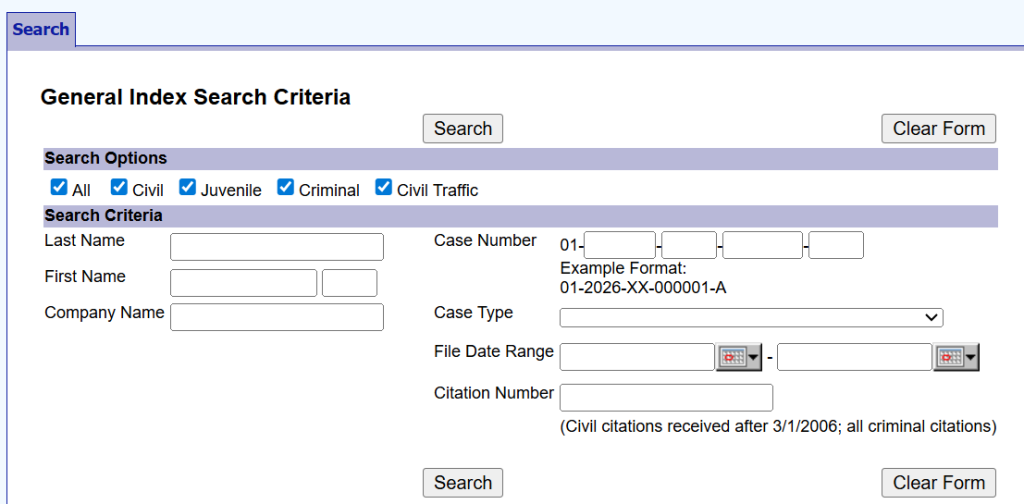
Select Search Criteria
Users can search using one or more fields:
Name Search
- Enter last name first
- Add first name or middle initial for better results
Case Number Search
- Enter full case number (without county prefix)
Date Filed
- Choose a start and end date to filter records
Case Type
- The system does not require all fields. Entering fewer fields still works for broader results.
Run the Case Lookup
- Click the search button
- The system shows a list of matching cases
- Each result displays:
- Case number
- Party names
- Case type
- Filing date
This step completes the initial case lookup within seconds.
View Case Details
- Click on a selected case
- Open the full record page
Users can see:
- Court docket entries
- Hearing schedules
- Filed motions and documents
- Case status and updates
Some documents are available for download if they are not restricted.
Download or Request Records
- Many files are available instantly in PDF format
- For certified copies:
- Submit a request to the clerk’s office
- Pay copy fees if required
Advanced Search Tips for Better Results
Using the right method improves record retrieval:
- Use exact spelling for names
- Try partial name searches if results are limited
- Enter the case number for direct results
- Apply date filters to narrow results
- Check different case types if unsure
What the Online Database Offers
The official online database includes:
- Civil case records (contracts, disputes)
- Criminal case files (charges, hearings)
- Traffic violations and citations
- Family law cases (divorce, custody)
- Probate and estate matters
Online records usually cover cases from the early 2000s onward, while older files may require an in-person search.
Limits and Restrictions to Know
Some records are not visible online:
- Confidential cases like adoption
- Juvenile records
- Sensitive personal data
The system may also:
- Log out after inactivity
- Limit document views per hour
These controls protect data and system performance.
Offline Record Search Option
Users can visit the clerk’s office for full record retrieval:
Address:
201 E University Ave, Gainesville, FL
What users can do:
- Use public terminals
- Request certified copies
- Get help from the staff
Mail and email requests are available for record copies if the online search does not show results.
Types of Cases in Alachua County Court
Alachua County Court handles criminal, civil, family, probate, and traffic cases through separate divisions. Each category includes specific records like charges, lawsuits, custody filings, and citations. The court system organizes cases into clear sections so users can identify records based on case type. Each division maintains detailed files that support case lookup, record retrieval, and public records search. This structure helps users review filings, track case progress, and check outcomes with clarity.
Criminal Cases
Criminal cases in criminal court, Alachua County, involve violations of state law, ranging from minor offenses to serious crimes. These cases often begin with an arrest and move through stages such as charges, hearings, and sentencing decisions. Court records provide detailed information about each step, including police reports and court actions. Many users check these records for background checks or legal research. The system tracks both open and closed cases with updated status details. Records may include penalties like fines, probation, or jail time, depending on the violation. This category plays a key role in maintaining public safety and legal accountability.
Key records include:
- Arrest records and booking details
- Filed charges and violations
- Court hearings and trial dates
- Sentencing outcomes and penalties
Civil Cases
Civil cases in civil court, Alachua County, focus on disputes between parties, usually involving money, property, or agreements. These cases do not involve criminal charges but address claims where one party seeks compensation or resolution. Court records show how disputes progress through filings, responses, and court rulings. Many users search these records for legal research or claim verification. The system includes both small claims and larger lawsuits with detailed documentation. Each case outlines the issue, the involved parties, and the final decision. This helps users review damages awarded or agreements enforced by the court.
Common civil matters include:
- Contract disputes and breaches
- Property or landlord-tenant issues
- Personal injury claims
- Small claims lawsuits
Family & Probate Cases
Family and probate cases in the family court of Alachua County deal with personal matters involving families and estates. These cases often include sensitive issues such as divorce, child custody, and guardianship. Probate cases handle estate matters after a person passes away, including will validation and asset distribution. Court records provide clear documentation of filings, court orders, and agreements. Many users rely on these records for legal verification or family-related case tracking. The system maintains updated details on custody arrangements, support orders, and estate proceedings. This category supports legal clarity in both family relationships and inheritance matters.
Typical records include:
- Marriage and divorce filings
- Child custody and support agreements
- Adoption and guardianship records
- Probate filings and estate documents
Traffic & Municipal Cases
Traffic and municipal cases in traffic court, Alachua County, involve violations related to road rules and local laws. These cases are common and usually involve tickets, citations, or minor offenses. Court records track each violation from issuance to resolution, including payment or court appearance details. Many users check these records to confirm fines or court dates. The system provides quick updates on case status and payment requirements. Some cases can be resolved without a hearing, while others require court review. This category helps maintain order on roads and within local regulations.
Common traffic records include:
- Citations and issued tickets
- Fine amounts and payment status
- Court dates or hearing notices
- Case resolution and outcomes
Clerk of Court Services in Alachua County
The Alachua County Clerk of the Court manages court records, filings, and official documents for all case types. This office supports court administration by handling document filing, maintaining case records, and providing public record services.
The clerk plays a central role in keeping the court system organized and transparent. This office records every filing, updates case records, and stores official documents for legal reference. Many users rely on the clerk for public records searches, certified copies, and case status checks. The office works with judges, attorneys, and the public to keep accurate legal documentation. Services are available through online tools and in-person requests for record retrieval. This function supports smooth court operations and reliable record management across all case types.
Role of the Clerk of Court
The Alachua County Clerk of the Court serves as the official record keeper for the court system. This role includes maintaining accurate files for every case and recording all legal actions. The clerk manages document filing for civil, criminal, family, and traffic cases. Each filing is logged, stored, and updated within the system for future reference. The office keeps track of court dates, filings, and final judgments. It supports court administration by organizing records and assisting with legal procedures. This role helps maintain accuracy and public trust in court records.
Core responsibilities include:
- Recording and maintaining case records
- Managing document filing for all case types
- Issuing certified copies of official documents
- Supporting judges and court staff with records
- Handling fees, fines, and court payments
Services Offered by the Clerk’s Office
The clerk’s office provides a wide range of services related to court records and official documents. These services help users retrieve information, file legal papers, and verify case details. Many services are available through the online system, which supports quick case lookup and record retrieval. In-person services are available for certified copies and detailed assistance. The office also manages public records requests and document verification. These services support both legal professionals and general users who need accurate court information.
Key services include:
- Case records search through the online database
- Filing legal documents for ongoing cases
- Requesting certified copies of court records
- Viewing court dockets and case updates
- Processing payments for fines and court fees
The Alachua County Clerk of Courts remains a key part of court administration, helping users manage and retrieve important legal records with ease.
Criminal Court Records in Alachua County
Criminal court records in Alachua County include details of arrests, charges, hearings, and final case outcomes. These records show how felony and misdemeanor cases move through the court system from filing to resolution.
Criminal court records document every stage of a criminal case, starting from arrest and continuing through court hearings and sentencing. Each record includes official details such as charges filed, court appearances, and final judgments. The system separates different levels of offenses, including felony and misdemeanor cases. Users often review these records for legal research, background checks, or case tracking. Arrest information may appear early, while full court records develop as the case progresses. The clerk’s system maintains updated records for public reference and legal use.
Arrest Records vs Court Records
Arrest records and court records are related but not the same in criminal court records Alachua County. Arrest records are created at the time of detention by law enforcement, while court records are generated during legal proceedings. Arrest records show initial accusations, booking details, and charges at the time of arrest. Court records provide a full legal history, including hearings, motions, and final decisions. Over time, arrest information becomes part of the larger court record if the case moves forward. Both types help track the legal process from start to finish.
- Arrest Records
- Created at the time of arrest
- Includes booking details and initial charges
- Prepared by law enforcement agencies
- Court Records
- Created during court proceedings
- Includes hearings, rulings, and judgments
- Maintained by the clerk of court
Felony vs Misdemeanor Cases
Criminal cases are divided into felony and misdemeanor categories based on severity. Felony cases involve serious offenses and often carry longer sentences or prison time. Misdemeanor cases are less severe and usually result in fines, probation, or short jail terms. This distinction affects how cases are processed and what penalties may apply. Felony records often involve more complex hearings and longer timelines. Misdemeanor cases may be resolved more quickly through simplified court procedures. Both types are included in criminal court records for public reference.
- Felony Cases
- Serious crimes like assault, robbery, or drug trafficking
- Longer sentences and higher penalties
- Multiple court hearings and trial stages
- Misdemeanor Cases
- Minor offenses like petty theft or traffic-related violations
- Shorter sentences or fines
- Faster case resolution
Case Progression Stages in Criminal Court
A criminal case in Alachua County follows a structured process from arrest to final judgment. Each stage is recorded in official court records and updated throughout the case lifecycle. The process begins with an arrest and initial charges, followed by an arraignment where the defendant responds to charges. Next come pre-trial hearings, evidence review, and possible plea agreements. If no settlement occurs, the case proceeds to trial and final sentencing. Each step is documented in the court system for transparency and record accuracy.
- Arrest and Booking – Initial detention and charge recording
- Arraignment – Formal reading of charges in court
- Pre-trial Hearings – Evidence review and motions
- Trial Stage – Presentation of arguments and evidence
- Sentencing – Final judgment and penalties issued
Criminal court records in Alachua County provide a complete timeline of legal action, from arrest records to final court decisions, helping users follow each stage of the process clearly.
How to File a Case in Alachua County Court
To file case in Alachua County Court, a person must complete court forms, submit them to the clerk, and pay the filing fee. The submission process can be completed online, by mail, or in person, based on the case type.
Filing a case follows a structured legal filing process that begins with preparing accurate documents and ends with official case registration. The clerk records all submissions and assigns a case number for tracking within the system. Each filing becomes part of permanent case records used for hearings and decisions. The process applies to civil, family, probate, and other case types with specific form requirements. Proper documentation helps reduce delays and supports faster processing. Users can monitor progress through the online database after submission. Clear steps and correct paperwork help complete the process smoothly.
Filing Process
The submission process includes several stages that must be completed in order for the court to accept the case. Each step plays a role in recording accurate legal information and starting the case officially. Users begin by identifying the correct case type and preparing the required court forms with all necessary details. After that, documents must be reviewed carefully to avoid errors that may lead to rejection. The filing is then submitted through the chosen method, followed by payment of applicable fees. Once accepted, the clerk assigns a case number and enters it into the system for tracking. This structured process helps maintain proper court administration and organized case records.
- Prepare and complete required court forms
- Review all information for accuracy
- Submit documents online, by mail, or in person
- Pay filing fees based on case type
- Receive a case number for tracking
- Monitor case status through the database
Required Documents for Legal Filing
The required documents depend on the type of case being filed, though most filings include standard court forms and supporting records. These documents form the foundation of the case and provide details about the parties and the legal issue. Court forms must be filled out completely with accurate names, dates, and claims. Supporting materials such as contracts, evidence, or identification help strengthen the filing. In family or probate cases, extra forms may be required for custody or estate details. The clerk reviews all documents before accepting the filing into official records. Proper documentation helps avoid delays and keeps the process efficient.
- Completed petition or complaint form
- Identification or party information
- Supporting documents or evidence
- Payment confirmation for filing fees
- Additional forms based on case type
Filing Methods Available
Alachua County Court offers multiple ways to complete the legal filing, giving users flexibility based on their needs. Online filing allows quick submission through the court’s e-filing system, which works well for standard cases. In-person filing provides direct assistance from clerk staff, which helps with complex cases or document review. Mail filing supports users who cannot visit the office but still need to submit documents. Each method follows the same submission process and results in official case registration. Users should select the method that fits their situation and document requirements. All methods lead to the creation of a case record within the court system.
- Online filing through e-filing portal
- In-person filing at clerk office
- Mail submission for remote filing
What Happens After Filing
After the case is filed, the clerk reviews the submission and enters it into the court system as part of official case records. The system assigns a case number, which allows users to track updates through docket search tools. The court may schedule hearings, request additional documents, or issue notices based on the case type. All actions are recorded and updated within the database for public records search. Users can follow case progress, review filings, and check court dates through the online system. This stage marks the transition from filing to active case management within court administration.
Dockets, Calendars & Hearing Schedules
The alachua county court docket provides a record of case activity, including filings, hearing dates, and updates. Users can check the court calendar to track hearing schedules and follow case progress in real time.
Court dockets and calendars help users stay informed about upcoming hearings and case timelines. The system lists all actions taken in a case, from initial filing to final decision. Each entry shows dates, motions, and court events in a clear sequence. The court calendar displays scheduled hearings by date, case type, or courtroom. This makes it easier to plan attendance or track legal proceedings. Many users rely on these tools for case schedule updates and hearing tracking. Regular updates keep the information current and reliable.
What is a Court Docket?
An alachua county court docket is a detailed record of all activities within a case. It shows every filing, motion, and court action in chronological order. Each entry includes dates, document types, and brief descriptions of events. This helps users follow the case from start to finish without confusion. Docket entries often include judge assignments, hearing notices, and status updates. Legal professionals and the public use this tool for case tracking and research. It serves as a central source for monitoring case progress and reviewing past actions.
- Lists all case events in order
- Includes filings, motions, and rulings
- Shows hearing dates and updates
- Tracks overall case progress
How to Check Court Calendars
The court calendar shows upcoming hearings and scheduled sessions for different case types. Users can search by date, courtroom, or case number to find relevant listings. This tool helps track when and where hearings will take place. It is useful for parties involved in a case, attorneys, and anyone needing schedule details. The calendar updates frequently to reflect any changes or new hearings. By checking regularly, users can stay informed about time-sensitive court events. This supports better planning and attendance.
- Search by date or case number
- View courtroom and judge details
- Check updated hearing schedules
- Track multiple cases at once
Tracking Hearing Dates and Case Schedules
Hearing tracking allows users to monitor hearing dates and overall case schedule with accuracy. Each case includes scheduled appearances, deadlines, and court sessions listed within the docket. Users can follow updates such as rescheduled hearings or new motions added to the timeline. The system helps reduce missed court dates by providing clear and updated information. Many users check schedules before attending court or preparing legal documents. This process supports better case management and organized planning. It also helps verify official court timelines for reference.
- Monitor upcoming hearing dates
- Check changes in schedule
- Review full case timeline
- Stay updated on court events
Benefits of Using Docket & Calendar Tools
Using docket and calendar tools helps users stay informed and organized throughout a case. These tools provide quick access to case schedule details without visiting the courthouse. They support accurate planning for hearings and legal deadlines. The system keeps all information in one place, which improves efficiency. Users can review past actions and prepare for upcoming events with clarity. This makes court processes easier to follow for both legal professionals and the public.
- Easy case schedule tracking
- Real-time updates on hearing dates
- Clear view of court activities
- Better preparation for court appearances
Alachua County Courthouse Location & Contact Info
The Alachua County Courthouse is located in Gainesville and serves as the main center for court services and records. It provides public access to the clerk’s office, case information, and multiple court departments. The courthouse acts as the central court location for filing, hearings, and record requests. It connects different departments such as civil, criminal, family, and traffic divisions under one system. Visitors can reach the clerk’s office for document filing, certified copies, and case inquiries. The building is open to the public during working hours for record access and court-related services. Clear contact details and directions help users reach the courthouse without confusion. It remains the main point for all public access to court operations and services.
Courthouse Address, Phone, and Office Hours
The Alachua County Courthouse is located in downtown Gainesville and serves as the primary center for legal proceedings. The clerk’s office inside the courthouse handles record requests and case-related services. Office hours follow standard weekday timings for public visits and administrative work. The phone line connects users with court staff for general inquiries and guidance. This contact information helps users plan visits for filings, hearings, or document requests.
Key contact details:
- Address: 201 E University Ave, Gainesville, FL 32601
- Phone: (352) 374-3636
- Office Hours (Monday to Friday): 8:30 AM – 5:00 PM
- Saturday & Sunday: Closed
Directions to Alachua County Courthouse
The courthouse is located in the downtown area of Gainesville, making it accessible from major roads and public transport routes. Visitors can reach the building by car, bus, or walking from nearby city locations. Parking areas are available close to the courthouse for public use. Clear signage helps guide visitors to the correct entrances for different departments. The building is designed to support smooth public access for court-related services.
- Located in downtown Gainesville
- Accessible via major city roads
- Public parking available nearby
- Bus routes connect to central stops
Departments Inside the Courthouse
The courthouse includes multiple departments that handle different types of cases and services. Each department manages specific records and court functions to keep the system organized. The clerk office plays a central role in maintaining documents and assisting the public. Other divisions handle hearings, filings, and case management across civil, criminal, and family matters. This structure helps users find the correct office for their needs without confusion.
Main departments include:
- Clerk of Court Office – records and filings
- Criminal Division – criminal hearings and cases
- Civil Division – lawsuits and disputes
- Family Division – divorce, custody, and related matters
- Traffic Division – citations and violations
Public Access Services
The courthouse provides public access to case information, records, and services through both in-person visits and online systems. Visitors can request documents, check case status, or attend scheduled hearings. The clerk office supports record retrieval and certified copies for legal use. Public terminals inside the courthouse allow users to search court records and dockets. Staff assistance is available for basic guidance on services and procedures.
- Case record search terminals available onsite
- Clerk’s office for document requests
- Public hearing attendance allowed
- Assistance for record-related queries
The Alachua County Courthouse remains the main hub for court services, offering direct access to records, departments, and official legal processes.
Frequently Asked Questions (FAQ’s)
Alachua County court records help residents access public case information, court filings, hearing schedules, and legal documents. Below are common questions people search for when looking for court cases and public records in Alachua County.
How to search court records?
Alachua County court records can be searched online through the county court case lookup system using a name, case number, citation number, or filing date. The public database allows users to review civil, criminal, family, probate, and traffic court cases from one search platform. Many records include hearing dates, case summaries, docket activity, and party details. Users may refine results by entering accurate spellings and date ranges for better search results. Some confidential or sealed cases may not appear in public search results because of Florida court privacy laws.
Are court cases public?
Most Alachua County court cases remain public and can be viewed through official court record systems under Florida public records law. Public access usually covers criminal cases, civil lawsuits, probate filings, traffic citations, and family court matters that are not sealed by the court. Certain records stay restricted, including juvenile cases, adoption records, mental health proceedings, and confidential personal information. Court officials may remove or redact sensitive data before public release. Access rules can vary depending on the type of case and court order status.
What details appear in case records?
Alachua County case records often contain important legal information connected to a court proceeding. Users may find case numbers, filing dates, hearing schedules, judge names, charges, motions, judgments, and party information within the record. Court dockets may show updates about hearings, payments, warrants, or legal filings submitted during the case process. Some records include downloadable court documents and official dispositions. The amount of visible information depends on court policies and the level of public access allowed for that case type.
Can criminal cases be checked online?
Yes, many Alachua County criminal court cases can be checked online through the public records search system maintained by the county court clerk. Users may search using a defendant name, citation number, or criminal case number to locate active or closed criminal proceedings. Search results may display charges, court appearances, sentencing details, bond information, and hearing updates. Online access helps users review case progress without visiting the courthouse in person. Restricted criminal records or sealed files may remain unavailable for public viewing.
How to get certified court copies?
Certified copies of Alachua County court records can be requested from the Clerk of Court’s office through online requests, mail applications, or in-person visits. Certified documents are commonly needed for legal verification, background checks, appeals, or official record use. Requesters usually need to provide case details such as names, case numbers, and filing information for faster processing. Copy fees and certification charges may apply depending on the number of pages requested. Processing time can vary based on court workload and document availability.